
The aim of this section is to:
- Providing a starting point for people jumping on a Bricks article.
- Providing reliable defaults
Base Section - Getting Started
A lot of your work will involve understanding the the structure of your Bricks Page. It’s important that you understand the hierarchy as pictured on the right-side.
So far, the most organized hierarchy we’ve established for a plate is:
- Section (To establish a section/plate)
- Container (To ensure that its width limited)
- Block/Elements (Where your contents are organized)
- Container (To ensure that its width limited)
If you’re unsure on to where to start, try to stick to this hierarchy.
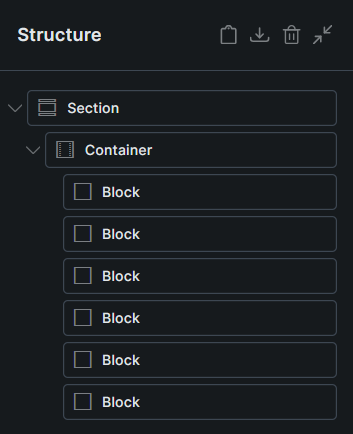
Visually the structure of your section/plate will look like this:
SECTION
CONTAINER
BLOCK
BLOCK
BLOCK
BLOCK
BLOCK
As you reached the block level you will start inserting elements. For example, Rich text inside the block.
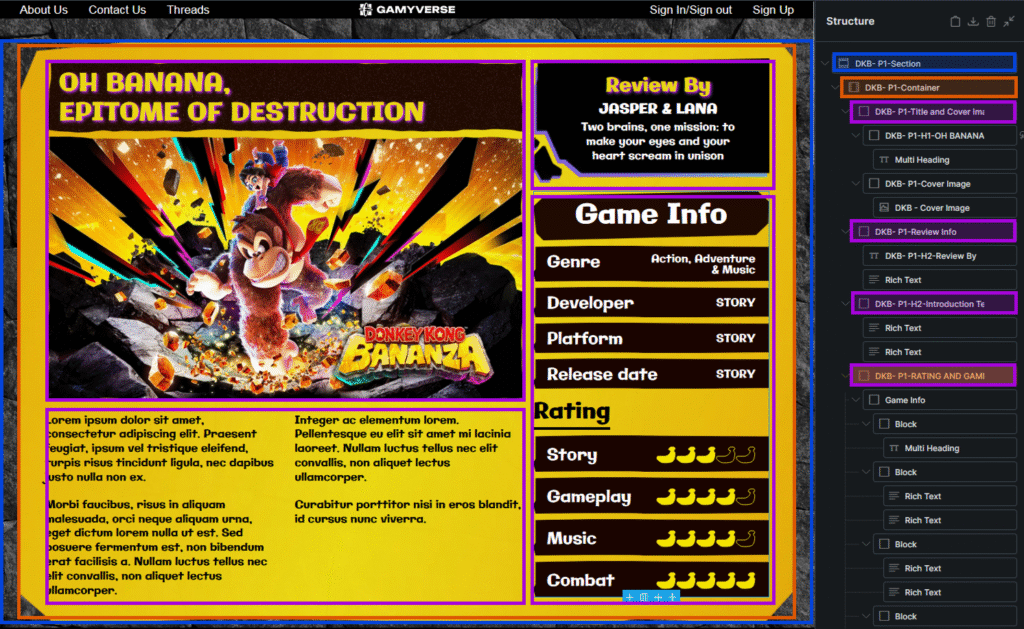
Here’s an example from one of the reviews, I color code it the same way as the visualization above:
- Blue for Section
- Orange for Container
- Purple for Block
Grid Containers
Due to the Magazine-like nature of our publication style, we opt to structure each plate using (CSS) Grid due to ultimate
Block Management
efoweifjewiofj